Travel safe · Privacy-first

Secure Your Space,
Anywhere You Go

HiddenScan turns your phone into a privacy bodyguard. Detect hidden cameras, infrared spy devices and suspicious Wi-Fi signals — in hotels, rentals, gyms or any place that should be private.

Camera lens detection
Infrared (IR) scanner
Wi-Fi device sweep
3 Scan modes
Free To download
7+ Languages
Camera Scan Lens detected
IR Detector 2 signals
Wi-Fi Review All safe
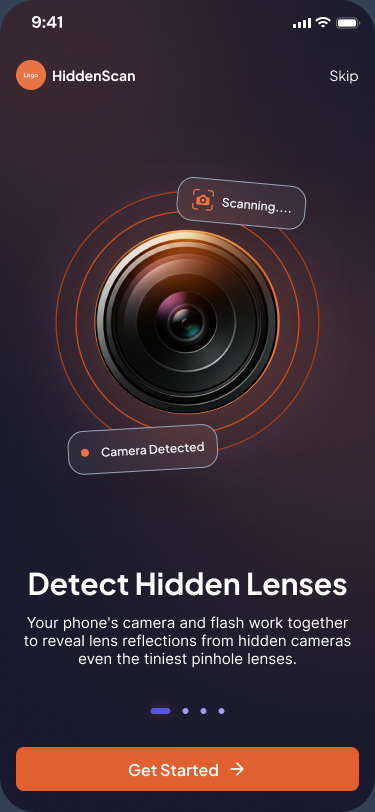
HiddenScan onboarding screen — Detect Hidden Lenses
3
Detection modes
1-Tap
Deep scan
100%
On-device privacy
7+
Languages supported
The hidden threat

Hidden cameras are closer than you think

Spy devices have become tiny, cheap and easy to disguise. They show up in vacation rentals, hotel rooms, changing rooms, even rideshares. You can't always trust your space — but you can always check it.

Disguised in everyday objects Smoke detectors, alarm clocks, USB chargers, picture frames, vents.
Often invisible to the naked eye Pinhole lenses and IR emitters can hide in plain sight.
Connected to local Wi-Fi Many stream live, leaving a trace HiddenScan can pick up.
DEEP SCAN ACTIVE
5 Sample scan
Smoke detector CAMERA
Wall outlet CAMERA
Picture frame LENS
USB charger IR EMITTER
HiddenScan scanning
Three layers of protection

Three scan modes. One privacy guard.

Each mode looks for a different type of surveillance. Use them on their own — or run all three with a single Deep Scan.

01 · OPTICAL

Camera Scanner

Your phone's camera and flash work together to reveal lens reflections from hidden cameras — even the tiniest pinhole lenses.

  • Pinhole lens detection
  • Smart targeting overlay
  • Auto-capture when found
02 · INFRARED

IR Detector

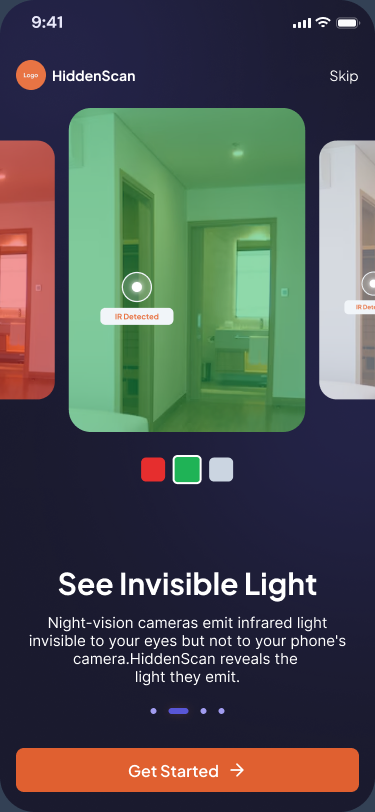
Night-vision cameras emit infrared light invisible to your eyes — but not to your phone's camera. HiddenScan reveals the light they emit.

  • Invisible light detection
  • Works in low light & dark
  • Spots night-vision tech
03 · NETWORK

Wi-Fi Review

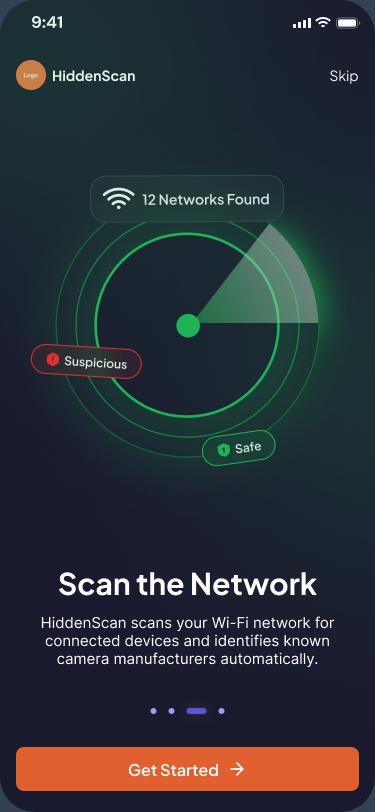
HiddenScan scans your Wi-Fi network for connected devices and identifies known camera manufacturers automatically.

  • Map every device
  • Suspicious device flags
  • Saved scan history
Beyond the scan

Tools that make every check count

Save it, share it, scan in your language — HiddenScan handles the small details so the scanning part stays effortless.

Scan History

Every scan is saved with date, room and result — review and re-run anytime.

Smart Guidance

Live tips while scanning — "image too dark", "move closer", "use flash" — nudge you to the best result.

7+ Languages

English, Arabic, Swedish, Turkish, Vietnamese, Korean and more — wherever you travel.

Granular Permissions

Control camera, IR and Wi-Fi access from a single, transparent settings screen.

Plain-English Results

Every scan ends in a clear verdict — Safe or Suspicious — with what to do next.

Share Reports

Export scan reports and share them with family, hosts or hotel managers in one tap.

A quick tour

See what HiddenScan can find

The same intro screens new users see when they open the app — one short slide for each scan mode.

See Invisible Light — onboarding screen
See Invisible Light Reveal night-vision IR your eyes can't see.
Scan the Network — onboarding screen
Scan the Network Identify suspicious devices on the local Wi-Fi.
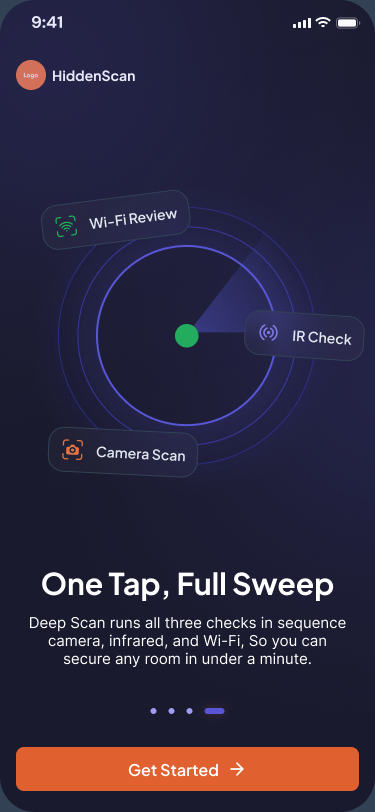
One Tap, Full Sweep — onboarding screen
One Tap, Full Sweep Run all three checks with a single Deep Scan.
How it works

Peace of mind in three steps

No setup, no learning curve. Walk into a room, open the app and tap.

1

Download HiddenScan

Free on the App Store and Google Play. Open it, allow the permissions you're comfortable with, and you're ready.

2

Pick a scan mode

Camera, IR or Wi-Fi — or just tap "Deep Scan" to run all three back-to-back. Walk slowly around the space.

3

Get a clear result

Safe or Suspicious — with explanations and next steps. Save the report, share it, or scan again.

Where it matters most

Use HiddenScan anywhere private

If a space should be private, it deserves a quick check.

Hotels & Resorts

Check the bedroom, bathroom and TV area before unpacking — a common place travellers report finding hidden cameras.

Vacation Rentals

Airbnb, Vrbo or any short-term stay — sweep before you settle in.

Public Bathrooms & Changing Rooms

Quick IR sweep of mirrors, vents and outlets — instant peace of mind.

Gyms & Spas

Locker rooms and fitting areas, scanned in seconds.

Co-working & Offices

Verify meeting rooms before sensitive conversations.

Rideshares & Rentals

Inspect rental cars and rideshares for in-cabin recording devices.

Privacy by design

The scanner that doesn't watch you back

HiddenScan exists to protect your privacy — so it would be ironic if it took yours. Every detection runs locally on your device. We don't sell, share or store your scan data.

  • All scans process on-device
  • No personal data sold or shared
  • Permissions are granular & opt-in
  • Delete your account in two taps
FAQ

Questions, answered

Everything you wanted to know about HiddenScan.

HiddenScan uses three proven techniques: optical glint detection, infrared light detection (which night-vision spy cameras emit), and Wi-Fi network scanning to flag unfamiliar devices. No tool guarantees 100% detection — but combining these three modes catches the vast majority of consumer-grade hidden devices.
No. Every detection runs entirely on your device. We don't upload images, scan results or network details to our servers. Your scan history is stored locally and you can clear it whenever you like.
Camera access is required for the Camera and IR scanners. Local network access is required for the Wi-Fi scanner. Both are explicit and you can revoke them in your phone's settings at any time. We don't request location, contacts or any unrelated permissions.
HiddenScan supports iPhone X (or newer) and Android devices running Android 9 and above. The IR scanner relies on your phone's camera — the newer the camera, the cleaner the IR result.
Yes — anytime, directly from your App Store or Google Play subscription settings. Your access continues until the end of the current billing period.
English, Arabic, Swedish, Turkish, Vietnamese, Korean and more — and we add new ones regularly.
Download HiddenScan

Take privacy into your own hands

Free to start. No account required. Get HiddenScan and run your first sweep in under a minute.

Free to download No account required On-device privacy